Perk/Tk
Whenever I want to create a GUI, I normally go to Perl/Tk. This toolkit if full of widgets to make a full-fledged GUI.
Tk was developed in the early 1990s as an extension for Tcl. However, Tk can be used by more than just Tcl – there are bindings for at least Haskell, Python, Ruby, Lisp, and most importantly Perl. Within Perl, there are several libraries – Tkx, Tcl::Tk, and Perl/Tk. I prefer Perl/Tk, mainly because I started with it and there are some great books on the topic.
Below is a bare bones example.
use warnings;
use strict;
use Tk;
my $mw = MainWindow->new();
$mw->Label(-text=>"Hello, world", -width=>50)->pack();
MainLoop;
This will generate something like the following.

Let’s break it down.
After including the library (use Tk), the MainWindow->new() call will create the main window. The MainWindow is a Toplevel widget that does not have a Parent ($mw->Parent == undef). Since the MainWindow is a type of Toplevel, we can pass in any of the Toplevel options, and in turn any Widget options.
use warnings;
use strict;
use Tk;
my $mw = MainWindow->new(
  -title => "My First GUI",
);
$mw->Label(-text=>"Hello, world", -width=>50)->pack();
MainLoop;

Menubars are a typical part of any GUI. To add one, simply create the Menu widget, and add it to the MainWindow. I like to follow the example in Chapter 12.2.2 in Mastering Perl/TK.
use warnings;
use strict;
use Tk;
my $mw = MainWindow->new(
  -title => "My First GUI",
);
$mw->configure(
  -menu => $mw->Menu(
    -menuitems => [
      map [q/cascade/, $_->[0], -menuitems => $_->[1]],
        ['~File',
          [
            [qw/command ~Quit -accelerator Ctrl-q -command/ => \&exit],
          ],
        ],
    ],
  ),
);
$mw->Label(-text=>"Hello, world", -width=>50)->pack();
MainLoop;
Now notice that the accelerator option for Quit is set to “Ctrl-q”. Unfortunately, this won’t do anything on it’s own – we have to add some hotkeys. This is done by binding to an event. The first argument is a string containing the event (CTRL-Q in this case), and the second argument is a reference to the subroutine.
use warnings;
use strict;
use Tk;
my $mw = MainWindow->new(
  -title => "My First GUI",
);
$mw->configure(
  -menu => $mw->Menu(
    -menuitems => [
      map [q/cascade/, $_->[0], -menuitems => $_->[1]],
        ['~File',
          [
            [qw/command ~Quit -accelerator Ctrl-q -command/ => \&exit],
          ],
        ],
    ],
  ),
);
$mw->bind("<Control-Key-q>", \&exit);
$mw->Label(-text=>"Hello, world", -width=>50)->pack();
MainLoop;

One last thing that I like to add to my GUIs is the ability to run an external script and capture the output to a text box. I normally use a ROText widget, since this ensures the captured text can’t be modified. I also need to add a require Tk::ROText to avoid a warning.
I’ll also add an Entry widget so that we can execute some commands.
use warnings;
use strict;
use Tk;
require Tk::ROText;
my $mw = MainWindow->new(
  -title => "My First GUI",
);
$mw->configure(
  -menu => $mw->Menu(
    -menuitems => [
      map [q/cascade/, $_->[0], -menuitems => $_->[1]],
        ['~File',
          [
            [qw/command ~Quit -accelerator Ctrl-q -command/ => \&exit],
          ],
        ],
    ],
  ),
);
$mw->bind("<Control-Key-q>", \&exit);
my $t = $mw->ROText()->pack();
my $c = $mw->Entry(-textvariable=>\(my $command))->pack(-fill=>'x');
MainLoop;
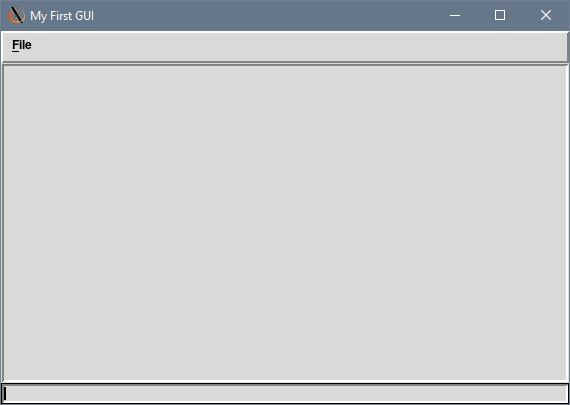
As with before, we’ll need to bind pressing Enter in the Entry to do something useful. I like to use the IPC::Open3 Perl module here for a few reasons –
First, it allows me to separate out STDERR and STDOUT so that I could potentially highlight errors in another color. The tagConfigure subroutine can create those tags with various colors, fonts, and even links. To use the tag, simply pass the tag name as the last parameter to the insert subroutine.
Second, it is non-blocking, meaning that the GUI will not stall while the command is executing. It also allows multiple commands to execute simultaneously.
Third, it gives me file handles to use with Tk::fileevent. This command creates a file event handler that will execute whenever the file handle becomes readable or writable. In this case, the fill_widget routine will read data from the file handle, and insert that data into the ROText widget. If the file handle is empty, we assume that the command has finished and turn off that file event.
use warnings;
use strict;
use Tk;
use Symbol;
use IPC::Open3;
require Tk::ROText;
my $mw = MainWindow->new(
  -title => "My First GUI",
);
$mw->configure(
  -menu => $mw->Menu(
    -menuitems => [
      map [q/cascade/, $_->[0], -menuitems => $_->[1]],
        ['~File',
          [
            [qw/command ~Quit -accelerator Ctrl-q -command/ => \&exit],
          ],
        ],
    ],
  ),
);
$mw->bind("<Control-Key-q>", \&exit);
my $t = $mw->ROText()->pack();
my $c = $mw->Entry(-textvariable=>\(my $command))->pack(-fill=>'x');
$c->bind('<Return>' => sub {
  my ($pid, $out, $err) = (0, gensym(), gensym());
  eval{$pid = open3(undef, $out, $err, $command)};
  if ($@) {
    $t->insert('end', "ERROR executing '$command'\n");
  } else {
    $mw->fileevent($out, 'readable', sub{fill_widget($t, $out)});
    $mw->fileevent($err, 'readable', sub{fill_widget($t, $err)});
  }
});
MainLoop;

sub fill_widget {
  my ($t, $fh) = @_;
  if (sysread($fh, my $data, 4096)) {
    $t->insert('end', $data);
  } else {
    $mw->fileevent($fh, 'readable', '');
  }
  $t->yview('end');
}
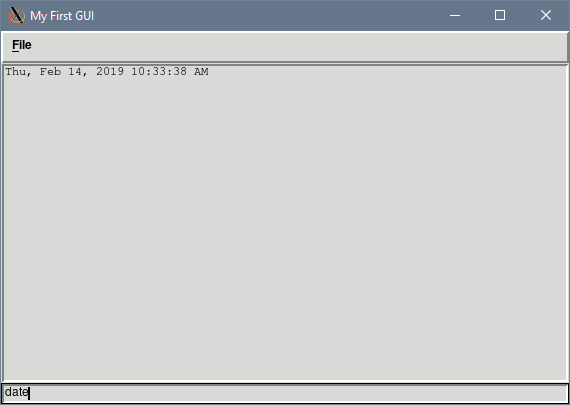
So in the end, we have a GUI written using the Perl/Tk framework. It has a menubar, hotkeys, and a way to asynchronously execute commands.
Here’s a few other Perl/Tk links: